16 Jun 2011

Jeithu Kaattuvom


This is our first short film. we will try to give our best. First of all, we release our trailer and then we will release our film. WAIT AND SEE

Sorry Friends Mobile Video Coverage quality is poor sorry to all

Actor

Sathish
Manikandan

Camera
Sridhar

Music
Dinesh

Editing
Lalith Naveen


4 Jun 2011

How Solar Panels Work

There are two main types of solar panels 1) solar electric panels and 2) solar water heating panels. We'll discuss water heating later. Right now, let's talk about solar photovoltaic (PV) panels, which provide electricity.


How PV Panels Work


PV systems convert sunlight directly into electricity. “Photo” refers to light and “voltaic” to electricity. A PV cell is made of a semiconductor material, usually crystalline silicon, which absorbs sunlight. You’ve seen PV cells at work in simple mechanisms like watches and calculators. You’ve probably even seen them for signs on the road. More complex PV systems produce solar electricity for houses and the utility grid. The utility grid is the power source available to your local electricity provider.   

        PV cells are typically combined into modules, or panels, containing about 40 cells. Roughly ten modules constitute a PV array, or grouping of panels.


Details on How PV Panels Work


Most PV panels contain a top protective layer, two specially treated layers of silicon with collecting circuitry attached to the top layer, and a polymer backing layer.
The top layer of silicon is treated to make it electrically negative; the back layer is treated it make it electrically positive. When sunlight knocks electrons loose from the silicon, electrons move up from the bottom layer of silicon and crowd the electrons in the top layer. The electrons freed from the top layer are collected by electrical contacts on the surface of the top layer and routed through an external circuit, thus providing power to the electrical system attached to the panels.
New technology, which we’ll get to in a later section, uses different, less expensive materials than silicon in PV panels to capture sunlight more affordably. 

Where are PV Panels Installed?

Most PV panels go on solar south-facing roofs parallel to the roof’s slope in the northern hemisphere, and on solar north-facing roofs in the southern hemisphere. Some arrays can be mounted on poles or on the ground, but such placement could be prohibited by local regulations or homeowners’ association rules. An important consideration is how many peak sun hours your system will get. Will your solar panels get year-round unshaded sun exposure from 9 a.m. - 3 p.m. (the ideal)? Is your climate stormy, foggy, dusty? The power of your system will vary depending on your geographical location. People in the northeastern US, for example, will need more solar panels on their roofs to provide the same amount of solar electricity as someone in Arizona.

What Happens at Night and on Cloudy Days?

Because solar electric systems only produce power when the sun is shining, many consumers also connect their solar system to a utility power grid that provides additional electricity when the solar panels are not producing enough. That type of solar system is called a grid-tied system.


Off-Grid vs. Grid-Tied Systems

Costs also vary depending on whether your solar energy system is grid-tied or off-grid. The cost of installing a typical off-grid PV system in a home ranges from $15,000-$20,000 per kilowatt hour. The cost lowers when the solar system is installed as part of the initial house construction, because it is easier and more cost-efficient to incorporate energy-saving design, PV panels and other equipment during construction than to add them after the house is already built.
Off-grid systems require batteries to store electricity and a charge regulator to make sure the batteries are not under- or overcharged. However, with the cost of extending power lines from the utility grid averaging from $20,00-$80,000 per mile, a PV system can be a wise investment for electricity in remote areas.


here are several varieties of off-grid systems:
  • Small stand-alone solar electricity systems are often used for RV power, lighting, cabins, back-up and portable power systems.
  • A complete stand-alone solar system provides independence from both fossil fuels and electric utility companies.
  • A typical complete stand-alone system uses two inverters to make sure power is available for large loads such as air conditioners, and one inverter can supply power when the other may not be working or needs servicing.
  • Such systems require sizable battery storage capacity so electricity is available when adverse weather diminishes solar power.
  • Batteries are an expensive component of stand-alone solar systems, initially costing between $80-$200 per kWh for residential use.
Hybrid systems combine PV panels with additional power sources such as fossil-fuel generators.
  • A hybrid system uses fewer solar panels than a typical stand-alone system, because a gasoline, propane or diesel generator produces power when solar panels are not producing enough.
  • Such systems can be used for cabins, remote homes and to power small medical facilities in third-world countries.
Here's brief comparision of the advantages and disadvantages of a grid tied system verse an off-grid system.

SystemAdvantagesDisadvatages
Off Grid
  • Freedom from electric bills
  • Independence of the public utility grid
  • Cost-effective for remote areas without power lines
  • Higher initial investment than grid-tied systems
  • Expense and maintenance of more system components such as batteries and charge regulators
  • Possibility of power outage in extended periods of adverse sun conditions
Grid Tied
  • Backup power if the solar system isn’t producing enough
  • Net metering if the solar system is producing too much power
  • Lower initial investment than for most off-grid systems
  • Some dependence on the utility grid
  • May not be able to use solar system in the event of a grid power failure
  • Some incentives require that contractors demonstrate proper licensing and capability in areas specific to grid-tied installation


2 Jun 2011

Sound Charge T-Shirt - T-shirt, battery charger

the latest invention in the world of mobile charging technology with an innovative gadget that powers mobile phones using sound.

The Sound Charge uses an existing technology in a revolutionary way; by reversing the use of a product called Piezoelectric film within a specially designed t-shirt, allowing people to charge their mobile phones whilst enjoying their favourite act at Glastonbury.

24 May 2011

Optimus Tactus Touch Keyboard


While we love touch surface, as people who type hundreds of thousands a word each week we know that there is a limit to them: keyboards. Like this Optimus Tactus, an extruded shape/touch surface/keyboard concept by Art.Lebedev. We really like the soon-to-be-released Optimus keyboard Art but, seriously, how often do you type on your computer?
I can imagine that artists, musicians and video editors would like something like this... however, there are solid LCD tablet displays and Tablet PCs on the market already. Experience shows that, for the time being, it's a limited market. Further limiting it to a keyboard replacement could be economically impractical at best, never mind how practical this could be. The issue of the price is the other key here: by the time a touch surface keyboard could be a commercial reality coming from China via Moscow, touch computing from Apple and Microsoft would be so ubiquitous that it won't make sense anymore


.


Optimus Tactus does not have physical keys, which means there are no restrictions ontheir shape and size.


Any part of the keyboard surface can be programmed to perform any function or todisplay any images.


Typing mode


Video mode

23 May 2011

Genius wireless Ring Mouse released

Genius has released a wireless ring mouse with 1000 dpi thumb-controlled sensor for scroll...

Genius has announced the release of its Wireless Thumb Cursor Controller, or ring mouse for short. The clicking and scrolling action of the lightweight mouse replacement is thumb-controlled, its proprietary optical touch technology offers users 1000 dpi sensitivity and it's said to last a month between charges.


The Genius Ring Mouse is worn on the index finger and controlled with the thumbThe Ring Mouse comes with a USB battery charger for topping up its Li-ion battery, a hard ...The proprietary touch sensor offers 1000 dpi sensitivity and the onboard battery is said t...

The 1.15 x 1.32 x 1.25-inch (29.3 x 33.7 x 32 mm), 0.42 ounce (12 g) Ring Mousehas 2.4GHz wireless connectivity with a range of around 30 feet (10 meters), and links to a USB nano/pico receiver slotted into a spare port on a Windows-based computer or laptop. Worn on the index finger, left and right click and optical touch control tracking technology are set around the top for thumb control of an onscreen cursor.


Although its primary use is likely to be controlling a projected presentation or photo slideshow, it should also prove useful as a travel laptop mouse, for those who regularly find themselves having to work in cramped conditions, or for those who just don't like to use a trackpad. The tracking sensitivity might also make it useful for mobile gamers.


I also remember coming across a similar product a few years ago that was issued to a user unable to operate a standard mouse due to rheumatic pain – with a thumb trackball on top, buttons for mouse click actions to the front and a trigger inside the ring. The new Ring Mouse from Genius would likely also satisfy such ergonomic requirements.
The IF award winning device comes with a USB battery charger for topping up its Li-ion battery, a hard carrying case and ioMedia software for web browsing, presentations, photo and video viewing. It's available for a suggested retail of US$69.99.


21 May 2011

Sony has introduced two new tablet.


      At a press conference in Tokyo, Sony has officially announced two tablet PC running OS Android 3.0 Honeycomb. Likely released by the code names of S1 and S2 plates will be named differently by the time of sale.

Both computers are based on 2-core processor, NVIDIA Tegra 2, have Wi-Fi modules and 3G/4G,technology support DLNA. S1 is equipped with multi-touch tablet 9.4-inch display and is intended forentertainment lovers. Likely 
to be the screen resolution of 1280 by 800.


      The second tablet, S2 has two twin 5.5-inch touch screen. They can be used for different functions.For example, one will "monitor", and another - the touch keyboard. Combining the two screens, you can get full square screen. It's safe to say that decisions in this form factor in this design from themanufacturers tablet has not yet been reported.

20 May 2011

LG LED LCD TV - 47LE4600


Introduction
 
Like every other recent LED televisions, this one boasts of two distinctive features: it saves electricity, and it's unbelievably thin. The latest in LG's series of Jazz televisions, the 47LE4600 looks good and also provides good features and connectivity options.


Design and Build Quality
 
The LG JAZZ has a fairly standard design with a slim form factor and a red strip under the bezel which is a common highlight in the JAZZ line up. However, while it may look slim from the side, it looks a bit bulky from the front due to the curved front bezel.

The build quality of this TV looks pretty solid but it still has some cheap plastic bits.  For instance the build quality of the supplied remote control is a notch below the ones from the competition. The remote has a very rubbery and low-quality-feel to it.

Connectivity and TV+ Options
 
This TV offers a plethora of connectivity options, including HDMI, Component, Co-axial, AV and USB. We were impressed by the fact LG decided to include four HDMI ports as opposed to the usual three found in most TVs.
 
USB connectivity gives users the extra option of playing videos, music and photos from a portable hard drive or a USB drive.
 
The television has a number of built-in picture modes too, which includes a cricket mode too instead of a sports mode. In practice, though, it is just standard sports mode and does not enhance the picture quality of the TV for specially viewing cricket in any way.

Performance-
 
-Picture quality
 
The television was mixed bag in terms of picture quality. For instance, the blacks looked a bit dull in the movies that we tested on the television. The television also seemed to suffer from some light bleeding issues, which were evident when we played the Blu-ray of Sherlock Holmes and the Dark Knight.
 
The colours were inconsistent in HD gameplay too. We were able to bring out the best in the television only after constant tinkering with the settings.

-Sound quality
 
Modern day ultra-thin televisions leave very little room for speakers. The Jazz does not find a way to beat that, housing a small 10-watt speaker.
 
The TV produces decent quality high-end frequencies, which tend to become ear piercing at high volumes but remain balanced. The same can be said of the mid-range frequencies.
 
While testing movies, the omission of a dedicated bass driver was glaring, but otherwise the sound quality was good. While testing music we found that these speakers were best suited to classical and bluesy genres. Modern genres like house and electronica should be avoided as the speakers cannot handle the fast frequency sweeps, which happen especially in the low-end and the speakers showed a tendency to clip at even lower volume levels when such genres of music were played.

-USB playback quality
 
The built in USB playback functionality is rock solid, we faced no lags while playing audio and video and there was no quality loss. Unfortunately, the HDTV does not support the .mkv format, which is the defacto High Definition format. Minus that, the Jazz is well supported, as it is compatible with .avi, .wmv and xvid formats.
 
Verdict
 
The LG Jazz 47" offers good picture quality backed with a plethora of features and decent audio playback abilities.
At Rs. 88,900 the television is a bit expensive for the level of picture quality and features offered.
 
Specifications
 
Pros
Loads of features
Good USB playback
Thin Bezel
Decent audio playback
 
Cons
Expensive
Average build quality
 
Ratings
·         Performance:  3
·         Price: 2
·         Ease of Setup: 4 
·         Ergonomics:  4
·         Wow Factor: 3

Microsoft Arc Touch Mouse


There's a new mouse in the Microsoft house. The new Arc Touch is the latest update of Microsoft's Arc wireless mouse series. Does it bring anything new to the wireless USB mouse genre or should you skip this iteration of the product? This is where you find out.


Packaging and Contents


The Arc Touch comes in a box significantly sleeker than the original came in. Inside the box is the mouse with the USB dongle, 2 AAA batteries and the manuals. MIA: the nice carrying case that the original Arc came with, something that would have been of use since the shiny surface of the mouse is easily scratched and the rubbery back can attract a lot of dust.


First Impression


It is difficult not to refer to Apple's magic mouse or the previous generation Arc mouse while talking about the Arc Touch. The Arc Touch is as sleek as, if not sleeker, than Apple's magic mouse. But unlike the completely touch sensitive magic mouse, the Arc Touch has two plastic physical keys for the left and right click, with a silver touch sensitive scroll in between.


At first glance, the Arc Touch does not look like a mouse at all. It is flat, like a mobile phone, in its 'dormant' or off state, and is not curved like a normal mouse. Bending it physically not only shapes it into a conventional mouse, but switches it on at the same time.


There is a distinct clicking sound once the mouse snaps into its operating position. We've never seen such a feature in a mouse before, and it gets points for slickness. You just need to straighten it back to switch it off. No small fiddly buttons required.


The USB connector of the mouse is pretty interesting too. It is extremely small and sticks to the magnetic bottom of the mouse, which is both a good and a bad thing. Black mark: it's really small and does not interfere with devices plugged into adjacent ports. Red mark:, if you slip the device into a bag loaded with goodies and the dongle comes off, finding it will be like searching for a needle in a haystack.


Performance

The Arc Touch performs well as a mouse with its BlueTrack laser sensor ensuring that the device runs smoothly on all surfaces and is very accurate. But, the touch-sensitive scroll-pad in the middle needs some getting used to.


It gives you a vibration feedback as you scroll. The vibration feedback however lasts for a heartbeat longer than comfortable even after you are done scrolling. Also, you have to double click on the slim strip in the middle for a middle click.

Another noticeable disadvantage is that if you wish to use the device with an Apple computer, you have limited customization options.


Verdict

This is a lifestyle product, built for style rather than utility. It has a couple of unique innovations that convert a mere peripheral to a stylish accessory. But, at a price of Rs. 3,600, it may be difficult to recommend, as there are other devices in this category that cost less than half. 

It is certainly meant for those who want to spend something extra to set them apart from the crowds. Do not buy if you are looking for good value for money - there are other, albeit more boring, options.


Pros:
·         Sleek
·         Bendable
·         Easy plug and play
·         Small USB donglel
Cons:
·         USB dongle can easily be lost
·         No carrying case
·         Expensive
Price: Rs. 3,600
 
RATINGS:
·         Performance: 3
·         Price: 2.5
·         Ease of setup: 5
·         Ergonomics: 3.5
·         Wow Factor: 5
·         Overall: 4 


10 May 2011

Connecting your home router with Wi5 network

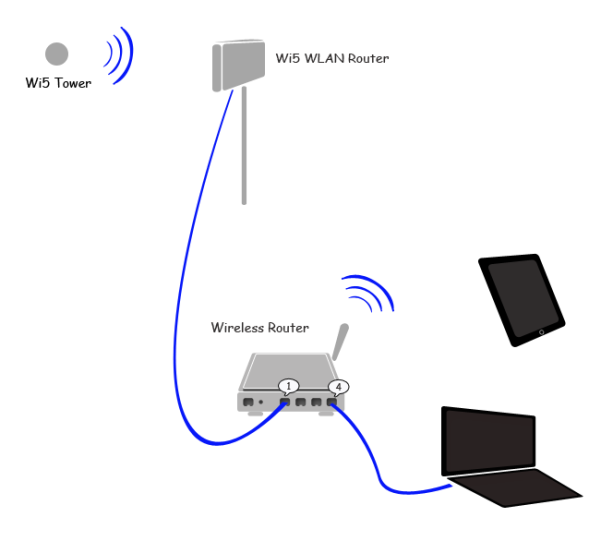
As you might have heard Zylog Wi5 is a wireless broadband service available in many Indian cities. Even though it is wireless, they will install a small signal receiver (modem+router) in the home roof tops for better signal reception. If you already have a home router to connect all your internet hungry devices, you might be perplexed as how to make them work together. Here is how the situation looks…


Wi5 to local router connection


The following instructions will help you to make it happen. What we are trying to do is connecting a router to another router…


Home Wireless Router:
Almost all the routers will have atleast 4 LAN ports to connect other devices to the network and a separate LAN port for connecting the ISP’s modem. Since Wi5 does not actually have a separate modem but instead is a modem+router, how you connect the both is bit different…
  1. Connect the Wi5 router to your home router in one of the 4 LAN sockets
  2. Login to your home router and disable its DHCP server. There can be only one DHCP server in a network and since we have enabled Wi5 router’s DHCP server, this is not needed.
  3. Restart the router if needed/prompted